Changelog

Everything new in InPaceline — features, improvements, and fixes as we ship them.

NewImprovedv1.1.0

Pitch Deck Analyzer — an investor-grade audit in one upload

Your pitch deck now gets the VC treatment without leaving InPaceline. Upload a PDF and get a scored, slide-by-slide breakdown of what's working, what's killing your raise, and exactly how to fix it — then chat with an investor about it and re-score after every revision.

Upload a deck, get a partner-grade verdict

Drop in your pitch deck and InPaceline audits it against the 10-slide framework investors actually fund against.

  • A clear investability score. A single 0–100 readout with a plain-English verdict — from "Not Fundable" to "Investor-Ready" — and the tier you're in.
  • Conviction Points & Strategic Deficits. The green flags an investor would lean into, and the red flags that would stall your raise.
  • Slide-by-slide audit. Every framework section gets a VC critique, a status (Cleared, Needs Proof, Hard Pass), and a specific "How To Fix" recommendation.
  • See the actual slide. Each section shows a thumbnail of the matching page from your deck, so the feedback is anchored to what investors will see.

Track your progress, revision after revision

Tightened the deck? Re-analyze it and see what changed.

  • A Progress Report comparing the new version to the last — your score delta plus what you Resolved, what's Still Outstanding, and any New Issues.
  • Per-slide change badges — Improved, Regressed, or Unchanged at a glance, so you can tell exactly which edits moved the needle.

Ask about your deck

Open a chat right alongside the audit and dig in.

  • Grounded in your actual deck. Ask anything — "how do I fix my traction slide?" — and get answers based on your real content, not generic advice.
  • One tap from any finding. "Ask about this" on any slide or red flag drops you straight into the conversation.

Find anything instantly with ⌘K

A new command palette puts the whole product a keystroke away.

  • Press ⌘K (or Ctrl K) anywhere to jump to any tool, run a quick action, or analyze a deck.
  • Ask your AI C-Suite from the same place — the bottom-right button and the palette now share one surface, so a question to your CMO, CFO, or COO is always one shortcut away.
NewImprovedv1.0.0

InPaceline 1.0 — the founder OS, reimagined

InPaceline 1.0 is a ground-up redesign of the entire product — a premium, focused workspace that brings your advisors, investors, finances, and weekly plan into one place.

A premium dark canvas

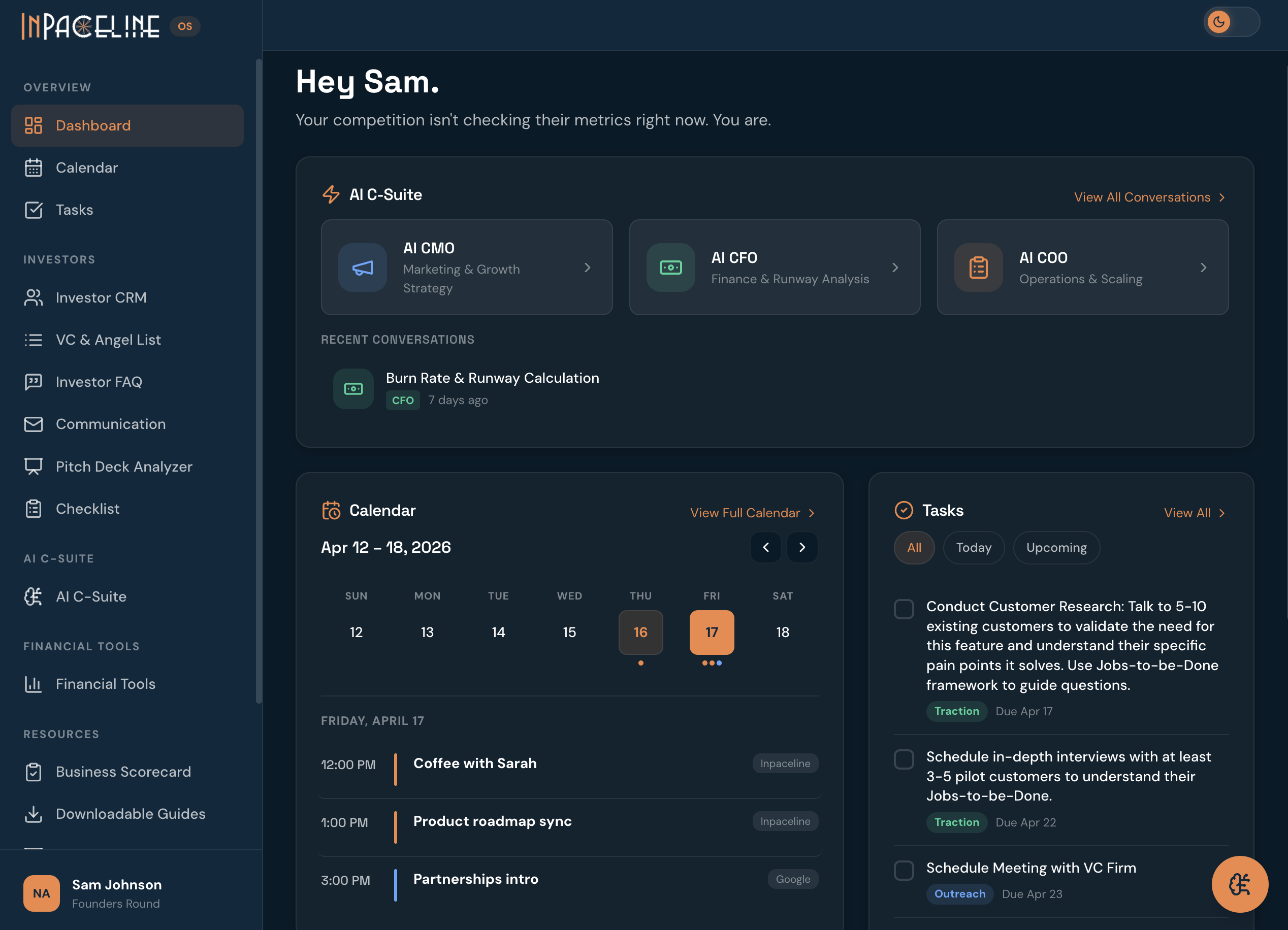
Deep midnight-navy surfaces throughout, with a redesigned left sidebar that groups everything by workflow: Overview (Dashboard, Calendar, Tasks), Investors, AI C-Suite, Financial Tools, and Resources.

The redesigned InPaceline dashboardThe new home screen — your AI C-Suite, calendar, and tasks in one view

A reimagined home screen

The new home screen opens with a "Recommended next step" activation card, your AI C-Suite front and center, and your calendar and tasks side by side.

Meet your AI C-Suite — CMO, CFO & COO

Three AI advisors that don't give generic advice. They learn from your business and turn answers into action.

  • It knows your business. Every answer is grounded in your own data — your stage, industry, team size, monthly revenue, target customer, goals, and biggest challenges.
  • It gives you concrete next steps. Every advisory answer ends with 2–4 specific action items — not vague suggestions, but the exact moves to make next.
  • One click to your task list. Hit + Task on any action item and it drops straight into your Weekly Action Plan.

Your AI C-Suite, now in Slack

Ask your AI CMO, CFO, and COO anything in Slack. Type a slash command in any channel and get an answer back instantly.

  • /cmo — go-to-market, brand, and growth strategy
  • /cfo — burn rate, financial modeling, and fundraising strategy
  • /coo — hiring, OKRs, scaling, and roadmap prioritization
  • Share to Slack — push any AI advisor answer to a channel for your team to see.

Revamped Tasks — Weekly + 90-Day planning

A rebuilt founder to-do system that connects your day-to-day to your quarter.

  • Weekly Action Plan — tasks with priority, category (Outreach, Pitch Prep, Traction, Product, Finance, Ops), due dates, and a live completion progress bar.
  • 90-Day Growth Plan — set objectives with key results, and track days remaining and status.
  • Create tasks from Slack/task [title] | [priority] | [category].
  • Auto-archiving of completed work so your board stays clean.

Google Calendar integration

Connect your Google Calendar and see your whole schedule inside InPaceline.

  • One-click connect, with automatic sync of past, present, and future events.
  • Month view with events laid out on the grid, plus a manual sync button.
Newv0.9.0

The foundation — investor tools, financial models, and your pitch

The first release of InPaceline brought the core founder toolkit online — everything you need to find investors, model your finances, and sharpen your pitch.

Investor tools

  • Investor CRM to track every conversation, stage, and next step with your investors.
  • VC & angel list — a searchable database of investors to discover and shortlist the right backers for your stage and sector.
  • Investor FAQ, relations, and portal-readiness checklists to keep your raise organized.

Financial tools

  • Burn rate calculator, P&L calculator, and a SaaS financial model to project runway and growth.
  • Business scorecard to benchmark where you stand.

Pitch & resources

  • AI pitch feedback on your deck.
  • A library of downloadable founder guides and playbooks.